ubuntu - 使用 ired 搭建 mail server 邮件服务器 roundcube(成功)
2025-10-27 11:44AM
参考链接:http://siweiblog.cn/blog/posts/linux-ired-mail-server-roundcube-2024-11
iRedMail github:https://github.com/iredmail/iRedMail
注意:请使用你自己的域名 mail.yourdomain.io, 我这里使用的是 mail.bida.exchange
可以使用 ubuntu 22.04 或者 ubuntu 24.04,我这里使用Ubuntu 22.04.5 LTS
1. 使用下面的命令
$ sudo apt update
$ sudo apt upgrade
$ sudo hostnamectl set-hostname mail.bida.exchange
$ hostname mail.bida.exchange
然后通过 hostname -f 来确认, 是否是 mail.bida.exchange
2. 修改 /etc/hosts 和 /etc/hostname 文件
2.1 修改 /etc/hosts 文件:
第一行: 127.0.0.1 mail.your-domain.com localhost (注意要把mail.xx 放在127.0.0.1 后面)
eg:# cat /etc/hosts
127.0.0.1 mail.bida.exchange localhost
2.2 修改 /etc/hostname 文件
只保留一行: mail.your-domain.com
eg:# cat /etc/hostname
mail.bida.exchange
3. 获得压缩文件:
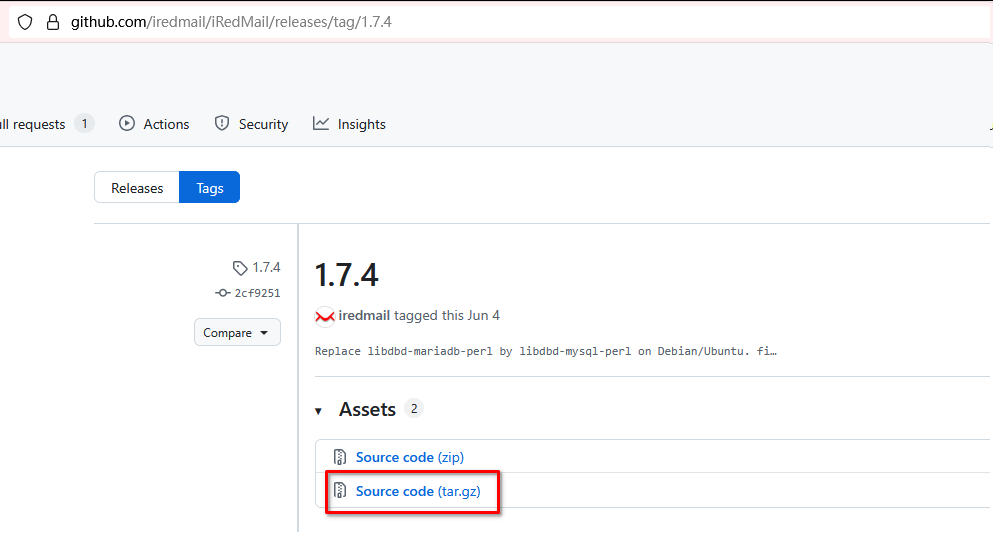
来这里: https://github.com/iredmail/iRedMail/releases/
wget https://github.com/iredmail/iRedMail/archive/1.7.4.tar.gz
5. 解压缩文件并安装
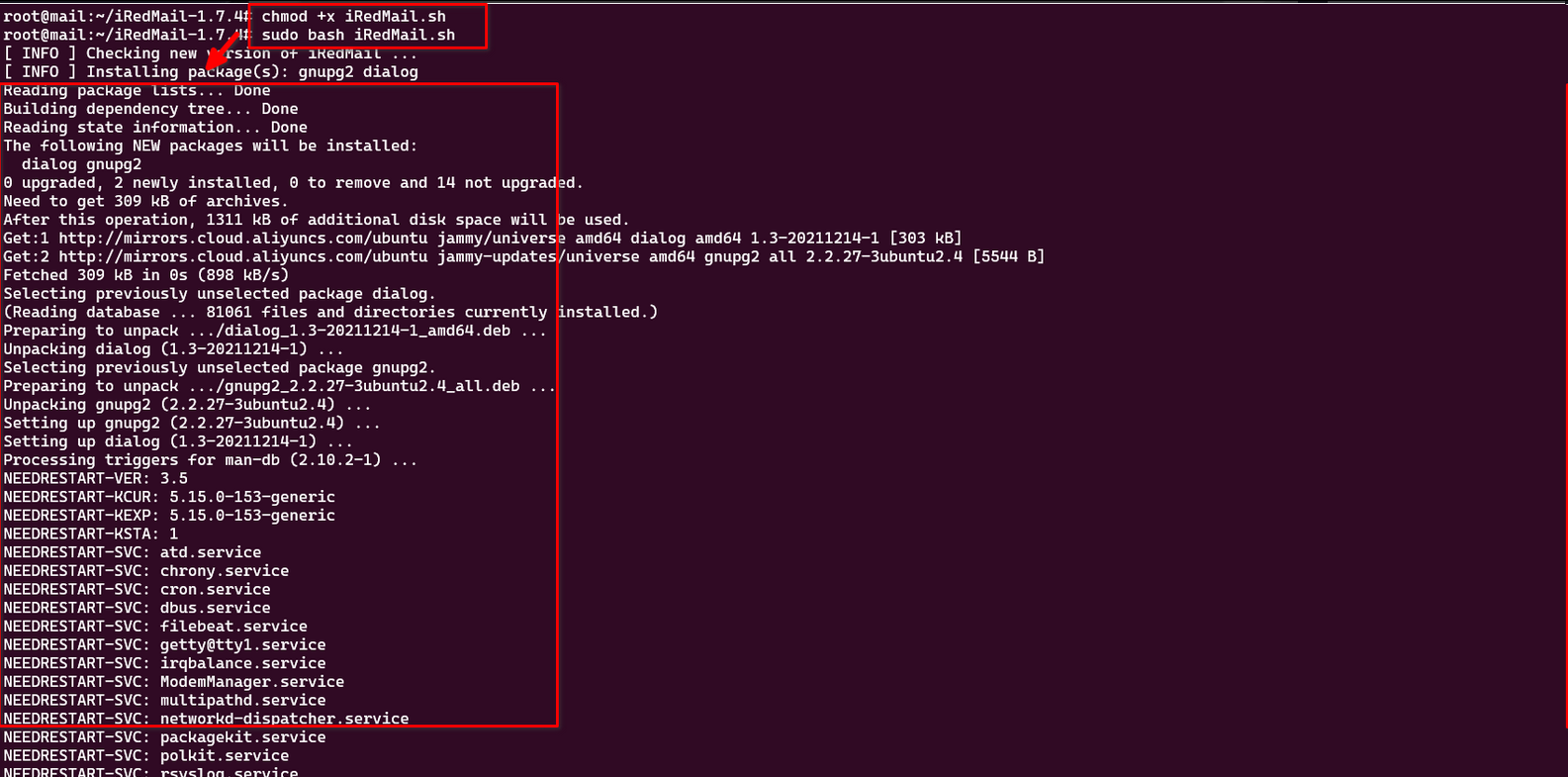
$ tar zxvf 1.7.4.tar.gz
$ cd iRedMail1.7.4
$ chmod +x iRedMail.sh
$ sudo bash iRedMail.sh
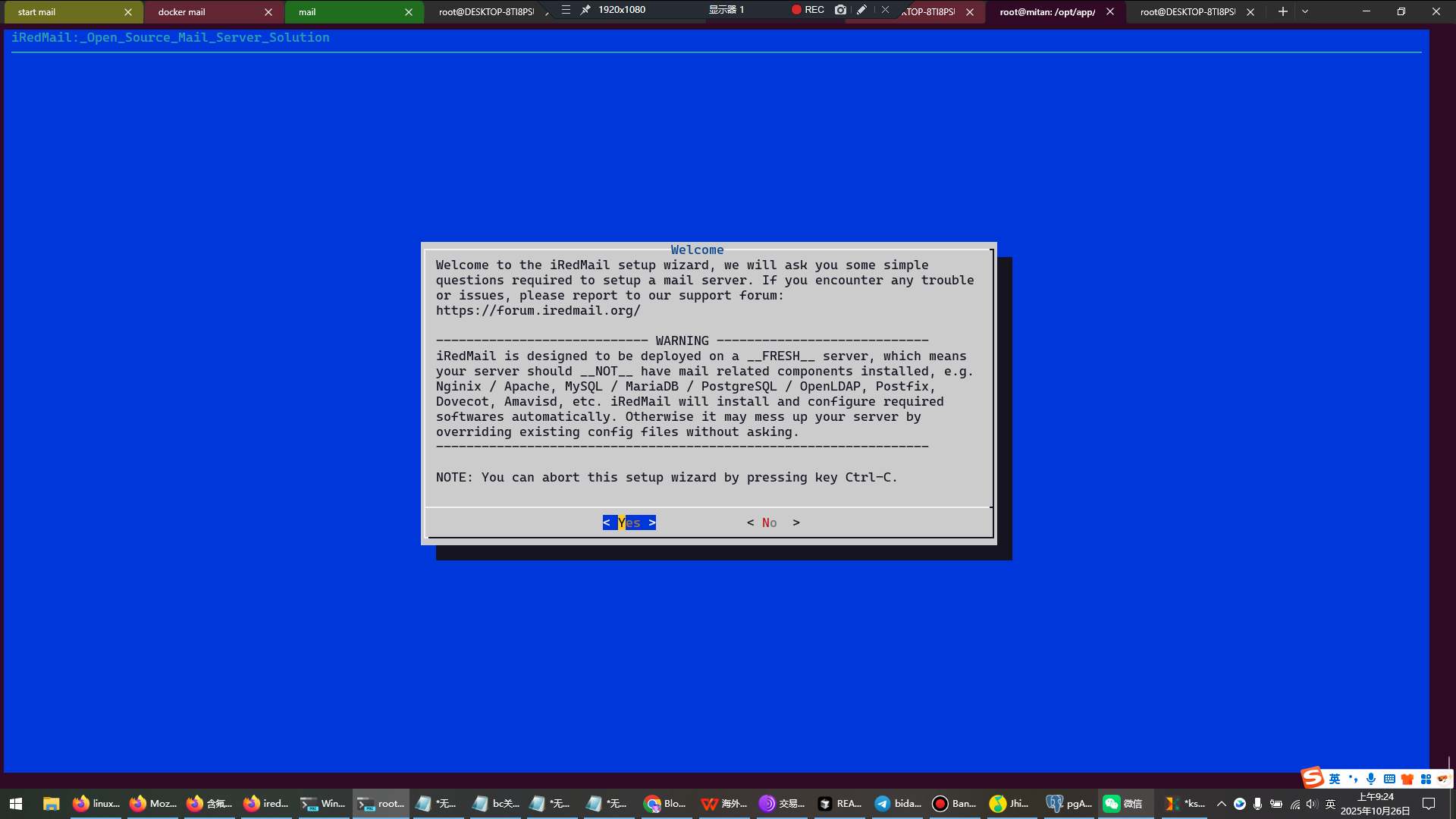
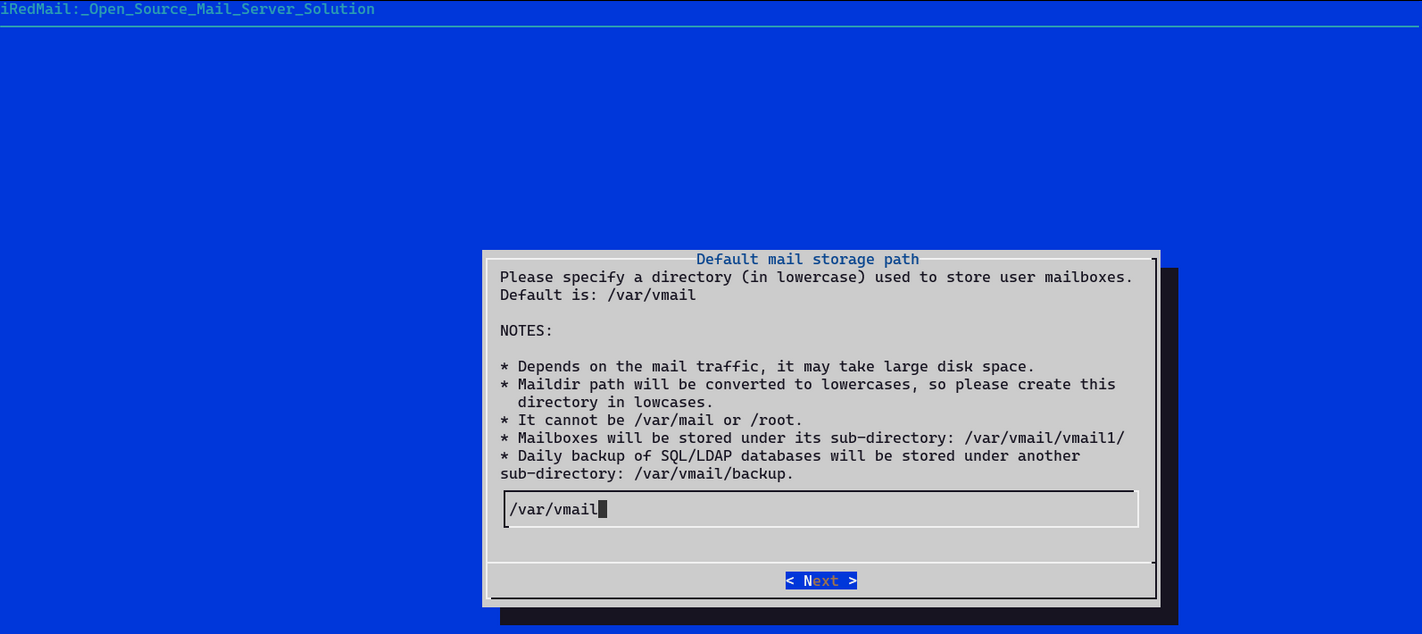
选择nginx:
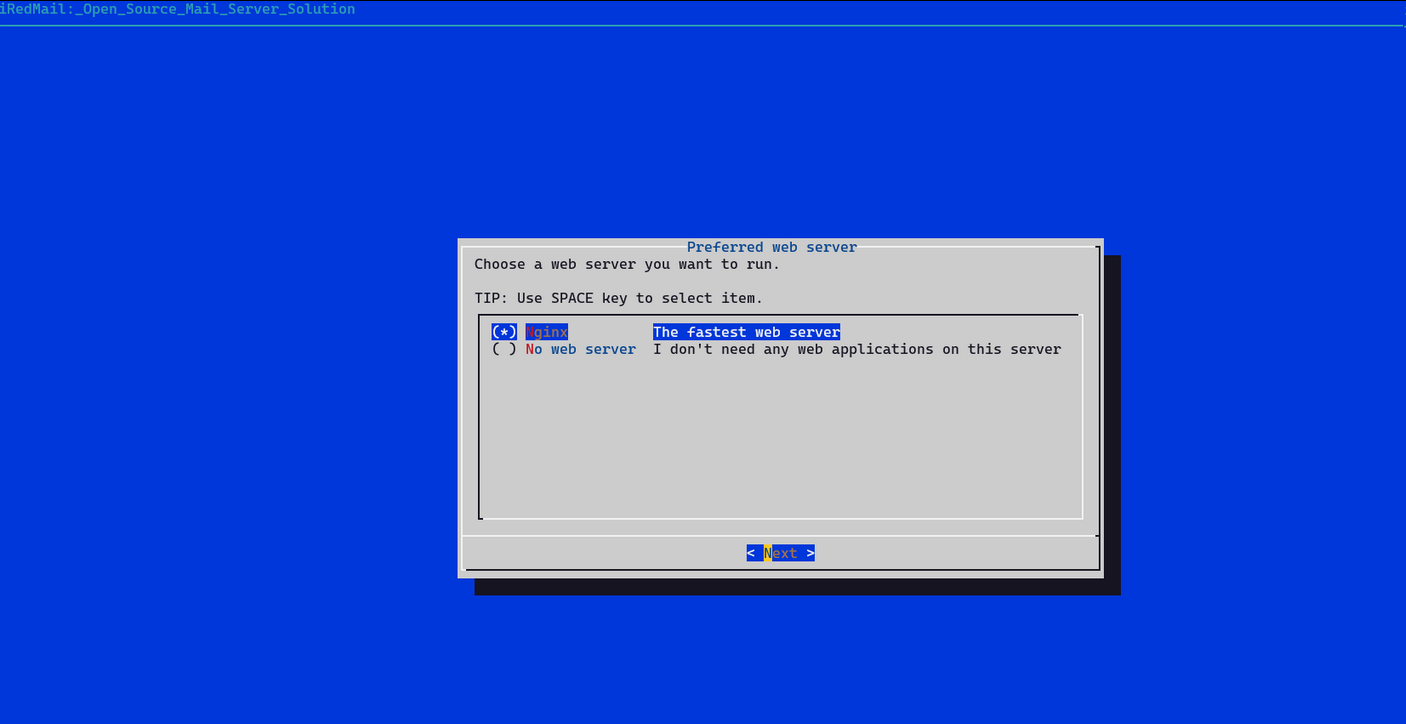
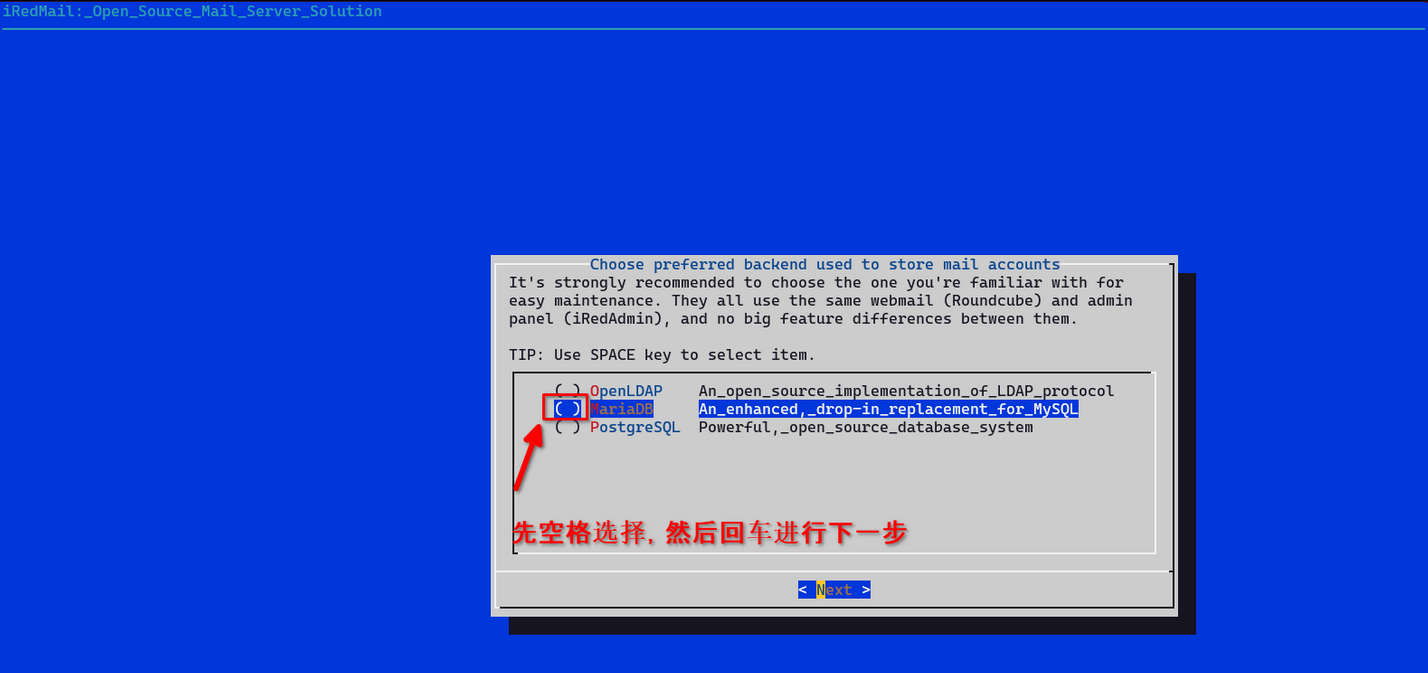
下一步.默认open ldap页面,选择maria DB (见上面的原文链接):
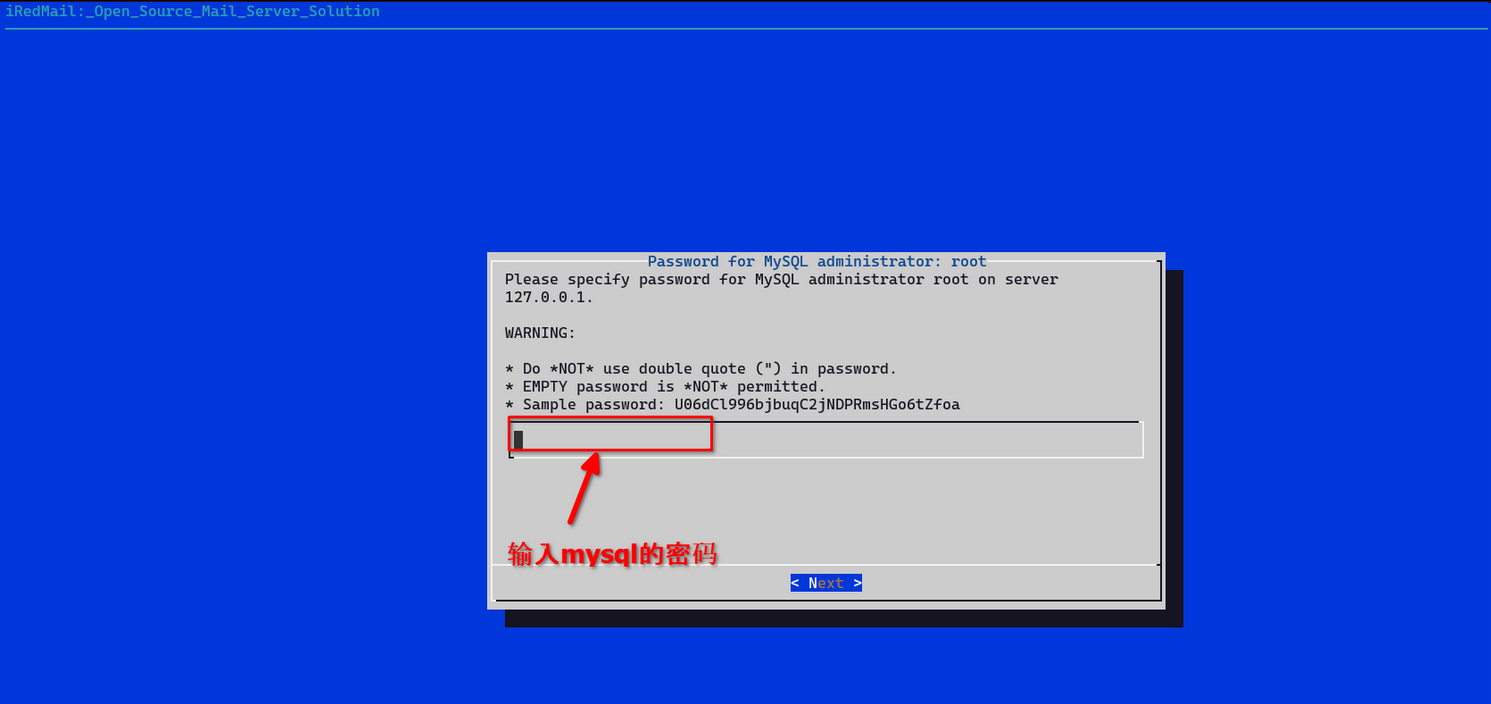
然后输入mysql 密码.
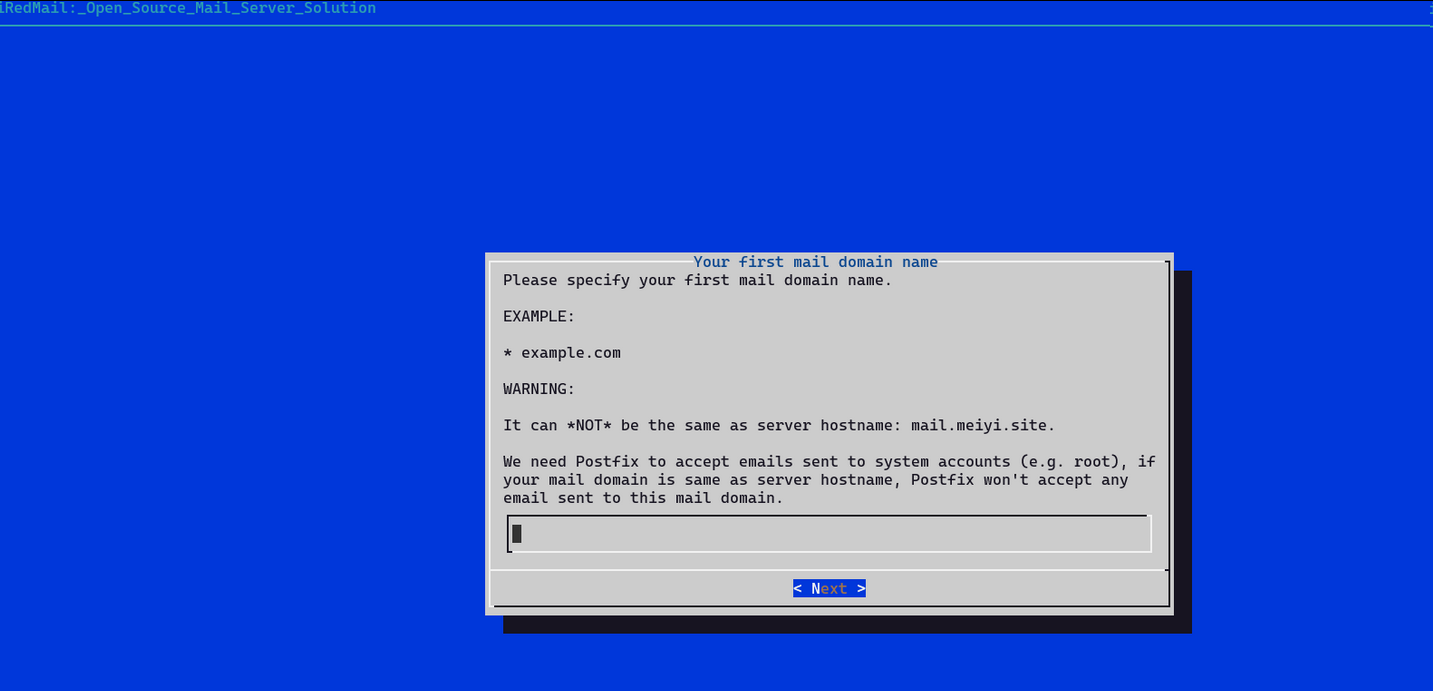
需要输入不带二级域名的域名, 例如 bida.exchange(yourdomain.com)而不是 mail.bida.exchange(mail.yourdomain.com)
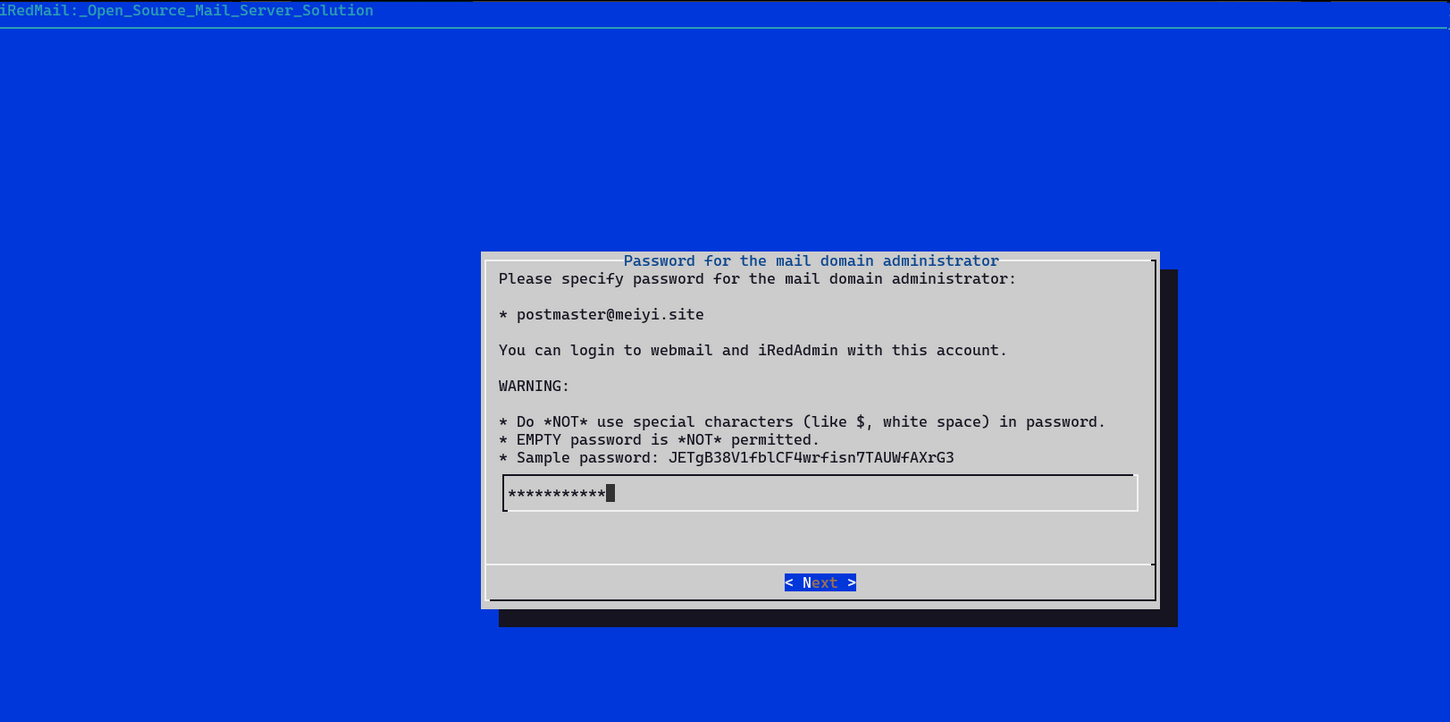
设置postmaster的密码:
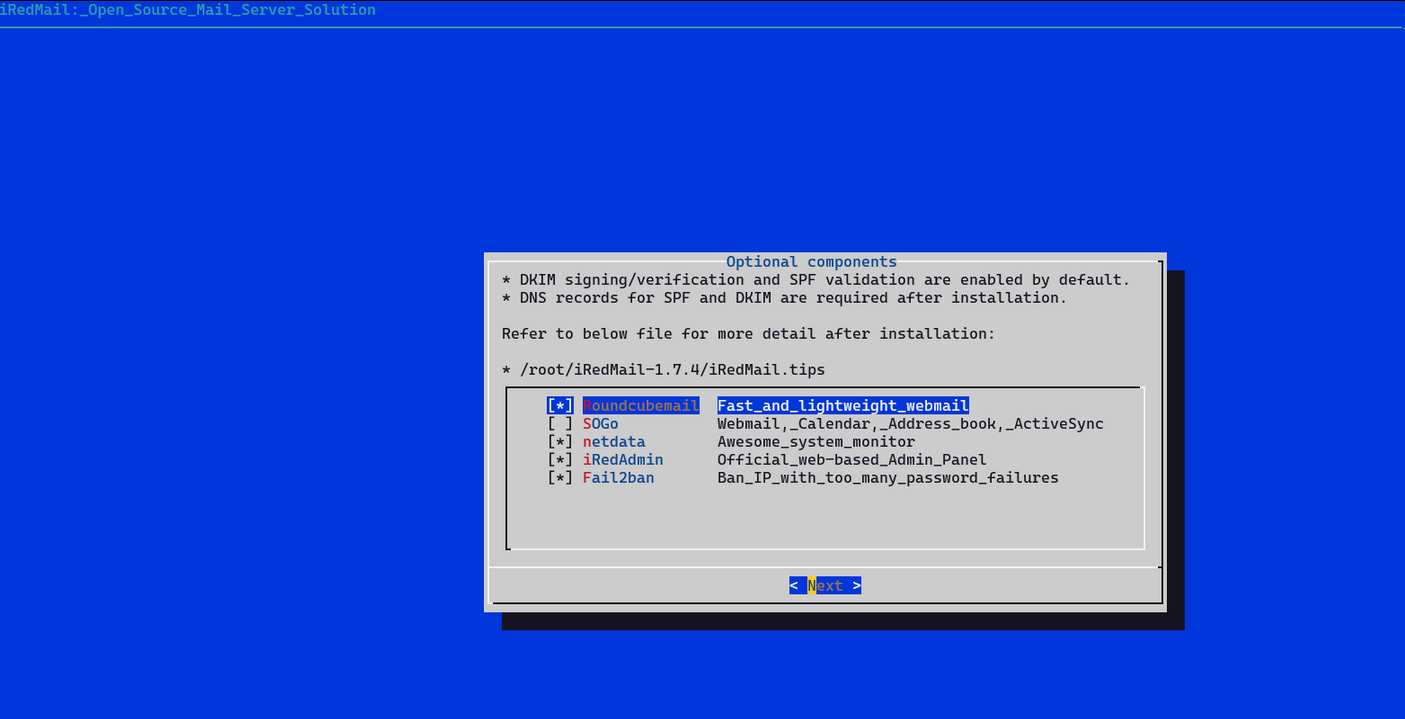
安装好之后, 还要根据说明,设置一些属性:
确认安装:
*************************************************************************
***************************** WARNING ***********************************
*************************************************************************
* *
* Below file contains sensitive infomation (username/password), please *
* do remember to *MOVE* it to a safe place after installation. *
* *
* * /root/iRedMail-1.7.4/config
* *
*************************************************************************
********************** Review your settings *****************************
*************************************************************************
* Storage base directory: /var/vmail
* Mailboxes:
* Daily backup of SQL/LDAP databases:
* Store mail accounts in: MariaDB
* Web server: Nginx
* First mail domain name: bida.exchange
* Mail domain admin: postmaster@bida.exchange
* Additional components: Roundcubemail netdata iRedAdmin Fail2ban
< Question > Continue? [y|N]
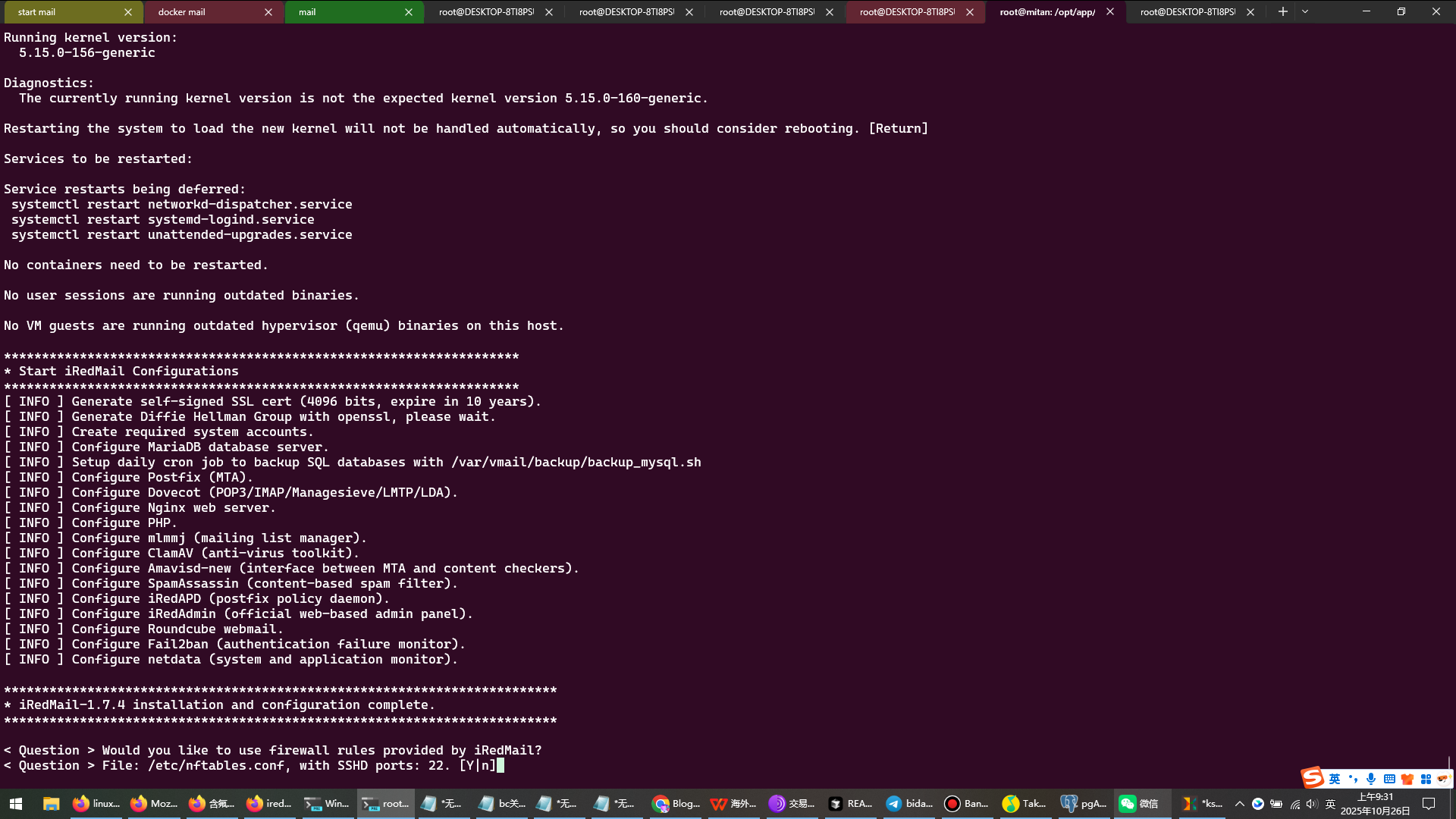
接下来就是安装后的提示,很重要,都要安装
接下来就是安装完成了
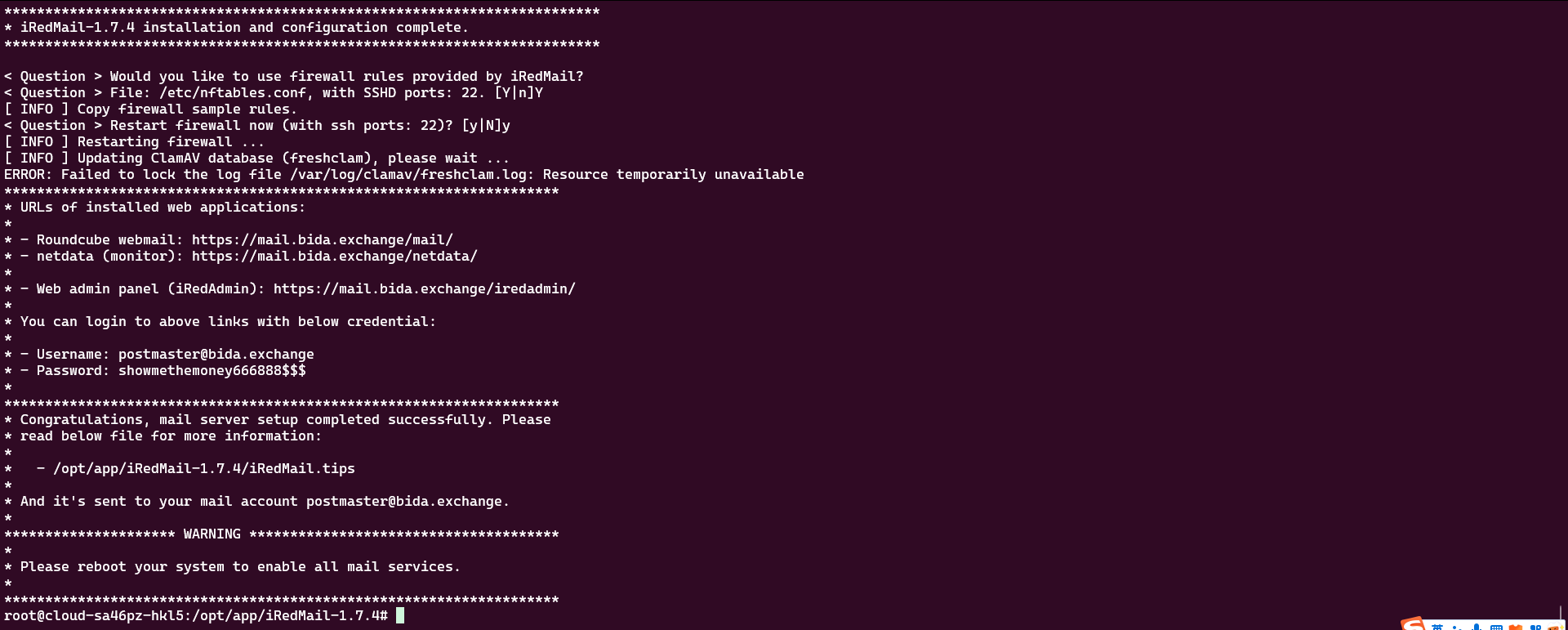
虽然有报错,但是不影响项目,所以先跳过
6. 域名解析
6.1 在域名解析中,新增 TXT 记录,在上面的 iRedMail.tips中的内容是这样:
DNS record for DKIM support:
; key#1 2048 bits, s=dkim, d=meiyi.site, /var/lib/dkim/meiyi.site.pem
dkim._domainkey.meiyi.site. 3600 TXT (
"v=DKIM1; p="
"MIIBIjANBgkqhkiG9w0BAQEFAAOCAQ8AMIIBCgKCAQEAju2nLO9m01bjeWX7j7vr"
"fKr04gBqDDtVlA35hJQqH7/ZjZFPC5y1cy6z1aXaNF3r80xY/V5185JevlMoj+S/"
"5+eYzlJNpw0xSnlgcjPIKj8+Ir5YByltjDGiaJVPcU4r1faFPjIcc4QkDCnp1DL/"
"uFKjDwjBqIYobDHv91JKnckOAneTJEDLrebAcsQU7skfD56PwFPGhHUE4giu03oM"
"958Xdwsz12Wn0ZQiaDnW0buB2PyxxF+3556VlkDcWtheO3QgTcn7rtWJRg5uZL9E"
"eGQU8mhs/aWV5LQSGOJq/sj0YnLrfNDwoLSkIpxbVi9qH8Onjc7N7CShy8h/wo1r"
"JQIDAQAB")
你需要把 3600 TXT() (注意这个括号) 中的字符串链接起来, 去掉空格, 去掉双引号, 例如:
v=DKIM1; p=MIIBIjANBgkqhkiG9w0BAQEFAAOCAQ8AMIIBCgKCAQEAju2nLO9m01bjeWX7j7vrfKr04gBqDDtVlA35hJQqH7/ZjZFPC5y1cy6z1aXaNF3r80xY/V5185JevlMoj+S/5+eYzlJNpw0xSnlgcjPIKj8+Ir5YByltjDGiaJVPcU4r1faFPjIcc4QkDCnp1DL/uFKjDwjBqIYobDHv91JKnckOAneTJEDLrebAcsQU7skfD56PwFPGhHUE4giu03oM958Xdwsz12Wn0ZQiaDnW0buB2PyxxF+3556VlkDcWtheO3QgTcn7rtWJRg5uZL9EeGQU8mhs/aWV5LQSGOJq/sj0YnLrfNDwoLSkIpxbVi9qH8Onjc7N7CShy8h/wo1rJQIDAQAB
6.2 验证dkim,在iRedmail服务器运行这个命令:
root@mail:/opt/iRedMail-1.7.4# sudo amavisd-new testkeys
TESTING#1 bida.exchange: dkim._domainkey.bida.exchange => pass
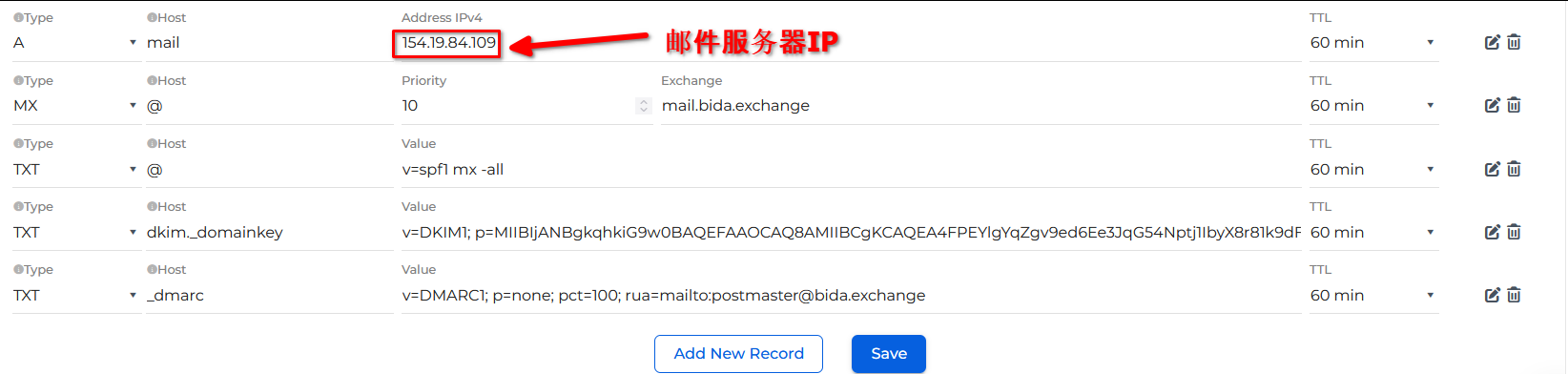
6.3 还需要增加一些其他的记录,设置域名的 MX记录,A记录和TXT记录,内容如下一共5个:
7. 如何验证后台程序已经运行了?
ps aux --sort rss 之后,会得到这样的结果: (可以看到有php 还有 uwsgi , 还有 clamd 这个后台进程)
我这里只有php和uwsgi,clamd 的进程(当时忘记截屏了)
8. 配置ssl证书(这个非常重要, 不能用普通的80 端口登录)
先配置好nginx. (如果是从阿里云上下载的ssl 证书,现在应该一个是 .pem ,另一个是 .key文件。
绑定域名后(就是增加一个txt记录) , 大约10分钟左右证书就可以下来,然后下载对应的nginx的证书文件)
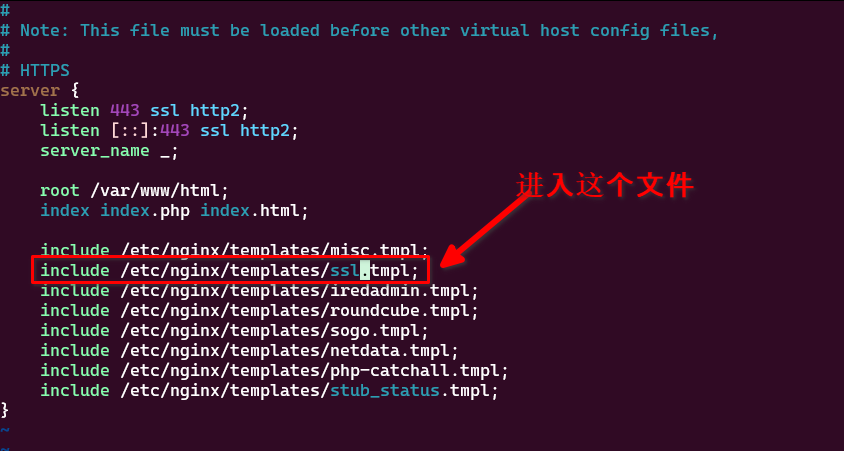
8.1 进入到ssl站点的配置文件: /etc/nginx/sites-enabled/00-default-ssl.conf
8.2 可以看到,内容配置在 /etc/nginx/templates/ssl.tmpl 中:
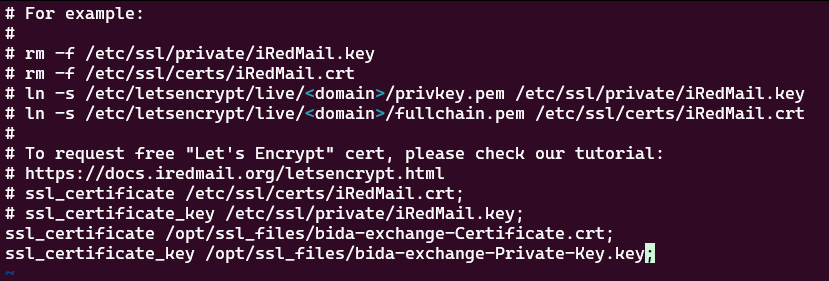
8.3 nginx -t 看看有没有错误,然后重启nginx : nginx -s stop, nginx
使用下面的用户名和密码登录上面的三个网站
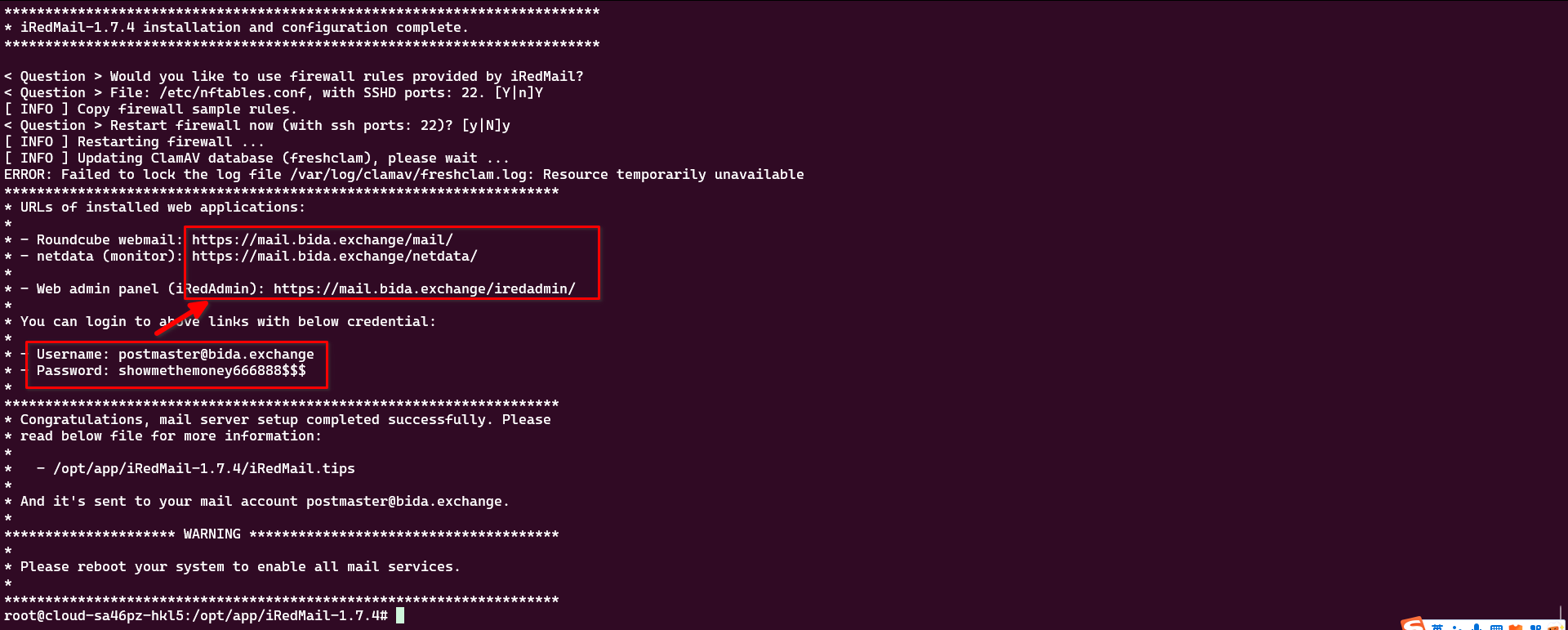
发现只有第二个网站可以打开,第一个和第三个都显示502
解决方法:
1. 检查相关服务
$ sudo systemctl status nginx php*fpm dovecot postfix
发现 nginx 没有启动
2. 查看nginx错误日志
$ tail -f /var/log/nginx/error.log
2025/10/27 09:01:17 [error] 130636#130636: *99 connect() failed (111: Unknown error) while connecting to upstream, client: 118.123.1.34, server: _, request: "GET /index.php HTTP/1.1", upstream: "fastcgi://127.0.0.1:9999", host: "154.19.84.109", referrer: "http://154.19.84.109/index.php"
2025/10/27 09:01:17 [error] 130636#130636: *106 connect() failed (111: Unknown error) while connecting to upstream, client: 118.123.1.34, server: _, request: "GET /index.php HTTP/1.1", upstream: "fastcgi://127.0.0.1:9999", host: "154.19.84.109", referrer: "http://154.19.84.109/index.php"
2025/10/27 09:01:17 [error] 130636#130636: *107 connect() failed (111: Unknown error) while connecting to upstream, client: 118.123.1.34, server: _, request: "GET /ips/index.php HTTP/1.1", upstream: "fastcgi://127.0.0.1:9999", host: "154.19.84.109", referrer: "http://154.19.84.109/ips/index.php"
2025/10/27 09:01:17 [error] 130636#130636: *104 open() "/var/www/html/login/stylesheets/theme.css" failed (2: No such file or directory), client: 118.123.1.34, server: _, request: "GET /login/stylesheets/theme.css HTTP/1.1", host: "154.19.84.109", referrer: "http://154.19.84.109/login/stylesheets/theme.css"
2025/10/27 09:01:17 [error] 130636#130636: *108 open() "/var/www/html/chs/js/lang_zh_tw.js" failed (2: No such file or directory), client: 118.123.1.34, server: _, request: "GET /chs/js/lang_zh_tw.js HTTP/1.1", host: "154.19.84.109", referrer: "http://154.19.84.109/chs/js/lang_zh_tw.js"
2025/10/27 09:01:17 [error] 130636#130636: *109 open() "/var/www/html/customer/js/lang_zh_tw.js" failed (2: No such file or directory), client: 118.123.1.34, server: _, request: "GET /customer/js/lang_zh_tw.js HTTP/1.1", host: "154.19.84.109", referrer: "http://154.19.84.109/customer/js/lang_zh_tw.js"
2025/10/27 09:01:17 [error] 130636#130636: *111 open() "/var/www/html/public/stylesheets/theme.css" failed (2: No such file or directory), client: 118.123.1.34, server: _, request: "GET /public/stylesheets/theme.css HTTP/1.1", host: "154.19.84.109", referrer: "http://154.19.84.109/public/stylesheets/theme.css"
2025/10/27 09:01:17 [error] 130636#130636: *110 open() "/var/www/html/stylesheets/theme.css" failed (2: No such file or directory), client: 118.123.1.34, server: _, request: "GET /stylesheets/theme.css HTTP/1.1", host: "154.19.84.109", referrer: "http://154.19.84.109/stylesheets/theme.css"
2025/10/27 09:14:34 [error] 130636#130636: *114 connect() failed (111: Unknown error) while connecting to upstream, client: 154.39.81.210, server: _, request: "GET /mail/ HTTP/2.0", upstream: "fastcgi://127.0.0.1:9999", host: "mail.bida.exchange", referrer: "https://mail.bida.exchange/"
2025/10/27 09:23:50 [error] 130636#130636: *118 connect() failed (111: Unknown error) while connecting to upstream, client: 154.39.81.210, server: _, request: "GET /iredadmin HTTP/2.0", upstream: "uwsgi://127.0.0.1:7791", host: "mail.bida.exchange"
发现对于 /mail/ 和 /iredadmin 的请求,Nginx 试图连接到上游服务(fastcgi 和 uwsgi)时失败了,错误是 111 (Connection refused)。这通常意味着上游服务没有运行或者没有监听对应的端口。
3. 再次检查相关服务
# 检查服务状态
sudo systemctl status nginx
sudo systemctl status php8.1-fpm # PHP版本可能不同,请调整
sudo systemctl status uwsgi
sudo systemctl status iredadmin
nginx服务状态
$ sudo systemctl status nginx
○ nginx.service - A high performance web server and a reverse proxy server
Loaded: loaded (/lib/systemd/system/nginx.service; enabled; vendor preset: enabled)
Active: inactive (dead) since Sun 2025-10-26 09:44:11 CST; 23h ago
Docs: man:nginx(8)
Main PID: 768 (code=exited, status=0/SUCCESS)
CPU: 1.721s
Oct 04 18:49:35 mitan systemd[1]: Starting A high performance web server and a reverse proxy server...
Oct 04 18:49:36 mitan systemd[1]: Started A high performance web server and a reverse proxy server.
Oct 26 09:29:07 mail.bida.exchange systemd[1]: Reloading A high performance web server and a reverse proxy server...
Oct 26 09:29:07 mail.bida.exchange systemd[1]: Reloaded A high performance web server and a reverse proxy server.
Oct 26 09:44:11 mail.bida.exchange systemd[1]: nginx.service: Deactivated successfully.
Oct 26 09:44:11 mail.bida.exchange systemd[1]: nginx.service: Consumed 1.721s CPU time.
php8.1-fpm服务状态
root@mail:/etc/nginx/sites-enabled# sudo systemctl status php8.1-fpm
● php8.1-fpm.service - The PHP 8.1 FastCGI Process Manager
Loaded: loaded (/lib/systemd/system/php8.1-fpm.service; enabled; vendor preset: enabled)
Active: active (running) since Sun 2025-10-26 09:29:08 CST; 24h ago
Docs: man:php-fpm8.1(8)
Main PID: 120306 (php-fpm8.1)
Status: "Processes active: 0, idle: 2, Requests: 0, slow: 0, Traffic: 0req/sec"
Tasks: 3 (limit: 4646)
Memory: 10.3M
CPU: 4.002s
CGroup: /system.slice/php8.1-fpm.service
├─120306 "php-fpm: master process (/etc/php/8.1/fpm/php-fpm.conf)" "" "" "" "" "" "" "" "" "" "" "" "" "" "" "" "" "" "" "" "" "" ""
├─120307 "php-fpm: pool www" "" "" "" "" "" "" "" "" "" "" "" "" "" "" "" "" "" "" "" "" "" "" "" "" "" "" "" "" "" "" "" "" "" "" "" "" "" "" "" "" "" "" "" "" "" "" "" "" ">
└─120308 "php-fpm: pool www" "" "" "" "" "" "" "" "" "" "" "" "" "" "" "" "" "" "" "" "" "" "" "" "" "" "" "" "" "" "" "" "" "" "" "" "" "" "" "" "" "" "" "" "" "" "" "" "" ">
Oct 26 09:29:08 mail.bida.exchange systemd[1]: Starting The PHP 8.1 FastCGI Process Manager...
Oct 26 09:29:08 mail.bida.exchange systemd[1]: Started The PHP 8.1 FastCGI Process Manager.
uwsgi服务状态
root@mail:/etc/nginx/sites-enabled# sudo systemctl status uwsgi
● uwsgi.service - LSB: Start/stop uWSGI server instance(s)
Loaded: loaded (/etc/init.d/uwsgi; generated)
Active: active (exited) since Sun 2025-10-26 09:28:16 CST; 24h ago
Docs: man:systemd-sysv-generator(8)
CPU: 28ms
Oct 26 09:28:16 mail.bida.exchange systemd[1]: Starting LSB: Start/stop uWSGI server instance(s)...
Oct 26 09:28:16 mail.bida.exchange uwsgi[113452]: * Starting app server(s) uwsgi
Oct 26 09:28:16 mail.bida.exchange uwsgi[113452]: ...done.
Oct 26 09:28:16 mail.bida.exchange systemd[1]: Started LSB: Start/stop uWSGI server instance(s).
iredadmin服务状态
root@mail:/etc/nginx/sites-enabled# sudo systemctl status iredadmin
○ iredadmin.service - iRedAdmin daemon service
Loaded: loaded (/lib/systemd/system/iredadmin.service; enabled; vendor preset: enabled)
Active: inactive (dead)
会发现Nginx和iRedAdmin服务目前都处于停止状态
查看iredadmin服务状态并重启
root@mail:/etc/nginx/sites-enabled# sudo systemctl start iredadmin
root@mail:/etc/nginx/sites-enabled# sudo systemctl status iredadmin
● iredadmin.service - iRedAdmin daemon service
Loaded: loaded (/lib/systemd/system/iredadmin.service; enabled; vendor preset: enabled)
Active: active (running) since Mon 2025-10-27 09:34:03 CST; 4s ago
Process: 784589 ExecStartPre=/bin/mkdir -p /var/run/iredadmin (code=exited, status=0/SUCCESS)
Process: 784590 ExecStartPre=/bin/chown iredadmin:iredadmin /var/run/iredadmin (code=exited, status=0/SUCCESS)
Process: 784591 ExecStartPre=/bin/chmod 0755 /var/run/iredadmin (code=exited, status=0/SUCCESS)
Main PID: 784592 (uwsgi)
Tasks: 6 (limit: 4646)
Memory: 27.6M
CPU: 364ms
CGroup: /system.slice/iredadmin.service
├─784592 /usr/bin/uwsgi --ini /opt/www/iredadmin/rc_scripts/uwsgi/debian.ini --pidfile /var/run/iredadmin/iredadmin.pid
├─784594 /usr/bin/uwsgi --ini /opt/www/iredadmin/rc_scripts/uwsgi/debian.ini --pidfile /var/run/iredadmin/iredadmin.pid
├─784595 /usr/bin/uwsgi --ini /opt/www/iredadmin/rc_scripts/uwsgi/debian.ini --pidfile /var/run/iredadmin/iredadmin.pid
├─784596 /usr/bin/uwsgi --ini /opt/www/iredadmin/rc_scripts/uwsgi/debian.ini --pidfile /var/run/iredadmin/iredadmin.pid
├─784597 /usr/bin/uwsgi --ini /opt/www/iredadmin/rc_scripts/uwsgi/debian.ini --pidfile /var/run/iredadmin/iredadmin.pid
└─784598 /usr/bin/uwsgi --ini /opt/www/iredadmin/rc_scripts/uwsgi/debian.ini --pidfile /var/run/iredadmin/iredadmin.pid
Oct 27 09:34:03 mail.bida.exchange iredadmin[784592]: mapped 462096 bytes (451 KB) for 5 cores
Oct 27 09:34:03 mail.bida.exchange iredadmin[784592]: *** Operational MODE: preforking ***
Oct 27 09:34:03 mail.bida.exchange iredadmin[784592]: WSGI app 0 (mountpoint='') ready in 0 seconds on interpreter 0x55c5e58885a0 pid: 784592 (default app)
Oct 27 09:34:03 mail.bida.exchange iredadmin[784592]: *** uWSGI is running in multiple interpreter mode ***
Oct 27 09:34:03 mail.bida.exchange iredadmin[784592]: spawned uWSGI master process (pid: 784592)
Oct 27 09:34:03 mail.bida.exchange iredadmin[784592]: spawned uWSGI worker 1 (pid: 784594, cores: 1)
Oct 27 09:34:03 mail.bida.exchange iredadmin[784592]: spawned uWSGI worker 2 (pid: 784595, cores: 1)
Oct 27 09:34:03 mail.bida.exchange iredadmin[784592]: spawned uWSGI worker 3 (pid: 784596, cores: 1)
Oct 27 09:34:03 mail.bida.exchange iredadmin[784592]: spawned uWSGI worker 4 (pid: 784597, cores: 1)
Oct 27 09:34:03 mail.bida.exchange iredadmin[784592]: spawned uWSGI worker 5 (pid: 784598, cores: 1)
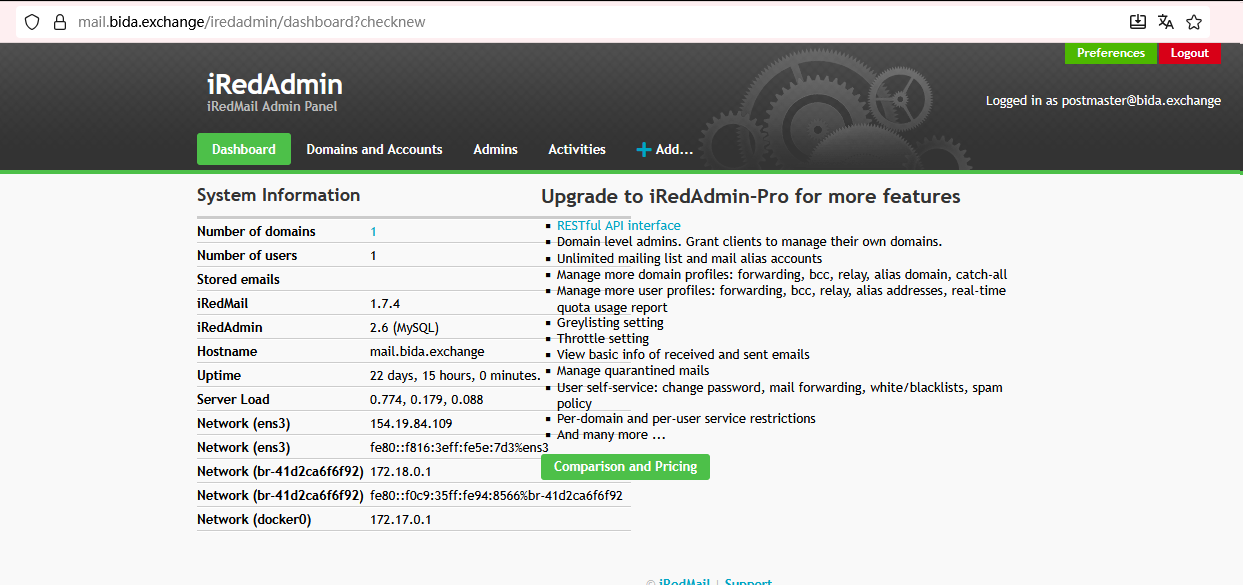
这样iredadmin就启动了,然后再浏览器就发现 https://mail.bida.exchange/iredadmin 就可以打开了
启动 nginx 并查看状态
root@mail:/etc/nginx/sites-enabled# sudo systemctl start nginx
Job for nginx.service failed because the control process exited with error code.
See "systemctl status nginx.service" and "journalctl -xeu nginx.service" for details.
root@mail:/etc/nginx/sites-enabled# sudo systemctl status nginx
× nginx.service - A high performance web server and a reverse proxy server
Loaded: loaded (/lib/systemd/system/nginx.service; enabled; vendor preset: enabled)
Active: failed (Result: exit-code) since Mon 2025-10-27 09:33:39 CST; 9s ago
Docs: man:nginx(8)
Process: 784375 ExecStartPre=/usr/sbin/nginx -t -q -g daemon on; master_process on; (code=exited, status=0/SUCCESS)
Process: 784376 ExecStart=/usr/sbin/nginx -g daemon on; master_process on; (code=exited, status=1/FAILURE)
CPU: 24ms
Oct 27 09:33:38 mail.bida.exchange nginx[784376]: nginx: [emerg] bind() to 0.0.0.0:80 failed (98: Unknown error)
Oct 27 09:33:38 mail.bida.exchange nginx[784376]: nginx: [emerg] bind() to [::]:80 failed (98: Unknown error)
Oct 27 09:33:39 mail.bida.exchange nginx[784376]: nginx: [emerg] bind() to 0.0.0.0:443 failed (98: Unknown error)
Oct 27 09:33:39 mail.bida.exchange nginx[784376]: nginx: [emerg] bind() to [::]:443 failed (98: Unknown error)
Oct 27 09:33:39 mail.bida.exchange nginx[784376]: nginx: [emerg] bind() to 0.0.0.0:80 failed (98: Unknown error)
Oct 27 09:33:39 mail.bida.exchange nginx[784376]: nginx: [emerg] bind() to [::]:80 failed (98: Unknown error)
Oct 27 09:33:39 mail.bida.exchange nginx[784376]: nginx: [emerg] still could not bind()
Oct 27 09:33:39 mail.bida.exchange systemd[1]: nginx.service: Control process exited, code=exited, status=1/FAILURE
Oct 27 09:33:39 mail.bida.exchange systemd[1]: nginx.service: Failed with result 'exit-code'.
Oct 27 09:33:39 mail.bida.exchange systemd[1]: Failed to start A high performance web server and a reverse proxy server.
就发现Nginx无法绑定到80和443端口,这通常是因为端口已被其他进程占用
解决方法:
1. 使用以下命令检查 80 和 443 端口是否被其他进程占用:
$ sudo netstat -tulpn | grep -E ':(80|443)\s'
或者
$ sudo ss -tulpn | grep -E ':(80|443)\s'
eg:
root@mail:/etc/nginx/sites-enabled# sudo netstat -tulpn | grep -E ':(80|443)\s'
sudo: netstat: command not found
root@mail:/etc/nginx/sites-enabled# sudo ss -tulpn | grep -E ':(80|443)\s'
tcp LISTEN 0 511 0.0.0.0:80 0.0.0.0:* users:(("nginx",pid=130636,fd=8),("nginx",pid=130635,fd=8))
tcp LISTEN 0 511 0.0.0.0:443 0.0.0.0:* users:(("nginx",pid=130636,fd=6),("nginx",pid=130635,fd=6))
tcp LISTEN 0 511 [::]:80 [::]:* users:(("nginx",pid=130636,fd=9),("nginx",pid=130635,fd=9))
tcp LISTEN 0 511 [::]:443 [::]:* users:(("nginx",pid=130636,fd=7),("nginx",pid=130635,fd=7))
因为Nginx的旧进程没有完全退出,所以导致nginx服务启动失败
2. 杀死这些进程
root@mail:/etc/nginx/sites-enabled# sudo pkill -9 nginx
root@mail:/etc/nginx/sites-enabled# sudo ss -tulpn | grep -E ':(80|443)\s'
3. 重启nginx
root@mail:/etc/nginx/sites-enabled# sudo systemctl start nginx
root@mail:/etc/nginx/sites-enabled# sudo systemctl status nginx
● nginx.service - A high performance web server and a reverse proxy server
Loaded: loaded (/lib/systemd/system/nginx.service; enabled; vendor preset: enabled)
Active: active (running) since Mon 2025-10-27 09:37:28 CST; 4s ago
Docs: man:nginx(8)
Process: 786195 ExecStartPre=/usr/sbin/nginx -t -q -g daemon on; master_process on; (code=exited, status=0/SUCCESS)
Process: 786196 ExecStart=/usr/sbin/nginx -g daemon on; master_process on; (code=exited, status=0/SUCCESS)
Main PID: 786197 (nginx)
Tasks: 2 (limit: 4646)
Memory: 2.9M
CPU: 25ms
CGroup: /system.slice/nginx.service
├─786197 "nginx: master process /usr/sbin/nginx -g daemon on; master_process on;"
└─786198 "nginx: worker process" "" "" "" "" "" "" "" "" "" "" "" "" "" "" "" "" "" "" "" "" "" "" "" "" "" "" ""
Oct 27 09:37:28 mail.bida.exchange systemd[1]: Starting A high performance web server and a reverse proxy server...
Oct 27 09:37:28 mail.bida.exchange systemd[1]: Started A high performance web server and a reverse proxy server.
4. 完成以上步骤之后,再重启相关服务,确保邮件系统协调一致
sudo systemctl restart php8.1-fpm
sudo systemctl restart uwsgi
sudo systemctl restart nginx
sudo systemctl restart iredadmin
然后再浏览访问 https://mail.bida.exchange/mail 页面就发现已经可以打开了
使用用户名和密码进行登录
发现mail页面无法登录,一直提示登录失败
解决方法:
1. 查看 dovecot 服务的运行状态
root@mail:/etc/nginx/sites-enabled# systemctl status dovecot mysql
● dovecot.service - Dovecot IMAP/POP3 email server
Loaded: loaded (/lib/systemd/system/dovecot.service; enabled; vendor preset: enabled)
Active: active (running) since Sun 2025-10-26 09:29:08 CST; 24h ago
Docs: man:dovecot(1)
https://doc.dovecot.org/
Main PID: 120291 (dovecot)
Status: "v2.3.16 (7e2e900c1a) running"
Tasks: 6 (limit: 4646)
Memory: 7.2M
CPU: 615ms
CGroup: /system.slice/dovecot.service
├─120291 /usr/sbin/dovecot -F
├─120293 dovecot/anvil
├─120294 dovecot/log
├─120295 dovecot/config
├─121715 dovecot/stats
└─787218 dovecot/auth
Oct 27 04:43:02 mail.bida.exchange dovecot[120294]: imap-login: Disconnected: Connection closed: SSL_accept() failed: error:0A00006C:SSL routines::bad key share (no auth attempts in 0 sec>
Oct 27 04:43:03 mail.bida.exchange dovecot[120294]: imap-login: Disconnected: Too many invalid commands (no auth attempts in 0 secs): user=<>, rip=167.99.182.61, lip=154.19.84.109, TLS, s>
Oct 27 09:39:22 mail.bida.exchange dovecot[120294]: imap-login: Disconnected: Connection closed (tried to use unsupported auth mechanism): user=<>, method=LOGIN, rip=127.0.0.1, lip=127.0.>
Oct 27 09:40:13 mail.bida.exchange dovecot[120294]: imap-login: Disconnected: Connection closed (tried to use unsupported auth mechanism): user=<>, method=LOGIN, rip=127.0.0.1, lip=127.0.>
Oct 27 09:41:02 mail.bida.exchange dovecot[120294]: imap-login: Disconnected: Connection closed (tried to use unsupported auth mechanism): user=<>, method=LOGIN, rip=127.0.0.1, lip=127.0.>
Oct 27 09:41:44 mail.bida.exchange dovecot[120294]: imap-login: Disconnected: Connection closed (tried to use unsupported auth mechanism): user=<>, method=LOGIN, rip=127.0.0.1, lip=127.0.>
Oct 27 09:42:05 mail.bida.exchange dovecot[120294]: imap-login: Disconnected: Connection closed (tried to use unsupported auth mechanism): user=<>, method=LOGIN, rip=127.0.0.1, lip=127.0.>
Oct 27 09:42:41 mail.bida.exchange dovecot[120294]: imap-login: Disconnected: Connection closed (tried to use unsupported auth mechanism): user=<>, method=LOGIN, rip=127.0.0.1, lip=127.0.>
Oct 27 09:43:23 mail.bida.exchange dovecot[120294]: imap-login: Disconnected: Connection closed (tried to use unsupported auth mechanism): user=<>, method=LOGIN, rip=127.0.0.1, lip=127.0.>
Oct 27 09:44:01 mail.bida.exchange dovecot[120294]: imap-login: Disconnected: Connection closed (tried to use unsupported auth mechanism): user=<>, method=LOGIN, rip=127.0.0.1, lip=127.0.>
● mariadb.service - MariaDB 10.6.22 database server
Loaded: loaded (/lib/systemd/system/mariadb.service; enabled; vendor preset: enabled)
Drop-In: /etc/systemd/system/mariadb.service.d
└─override.conf
Active: active (running) since Sun 2025-10-26 09:29:37 CST; 24h ago
Docs: man:mariadbd(8)
https://mariadb.com/kb/en/library/systemd/
Main PID: 121803 (mariadbd)
Status: "Taking your SQL requests now..."
Tasks: 13 (limit: 30668)
Memory: 77.1M
CPU: 8.664s
CGroup: /system.slice/mariadb.service
└─121803 /usr/sbin/mariadbd
Oct 26 09:29:37 mail.bida.exchange mariadbd[121803]: Version: '10.6.22-MariaDB-0ubuntu0.22.04.1' socket: '/run/mysqld/mysqld.sock' port: 3306 Ubuntu 22.04
Oct 26 09:29:37 mail.bida.exchange systemd[1]: Started MariaDB 10.6.22 database server.
Oct 26 09:29:37 mail.bida.exchange /etc/mysql/debian-start[121818]: Upgrading MySQL tables if necessary.
Oct 26 09:29:37 mail.bida.exchange /etc/mysql/debian-start[121822]: Looking for 'mariadb' as: /usr/bin/mariadb
可以发现主要原因是因为:
imap-login: Disconnected: Connection closed (tried to use unsupported auth mechanism)
这表明客户端(Roundcube)尝试使用一种 Dovecot 不支持的认证机制进行连接。
2. 修改Dovecot配置文件,启用必要的认证
sudo vim /etc/dovecot/conf.d/10-auth.conf
确保以下配置
# 启用明文认证(在 SSL/TLS 下是安全的)
disable_plaintext_auth = yes
# 启用的认证机制 - 确保包含 LOGIN
auth_mechanisms = plain login
eg:文件内容如下:
# cat /etc/dovecot/conf.d/10-auth.conf
##
## Authentication processes
##
# Disable LOGIN command and all other plaintext authentications unless
# SSL/TLS is used (LOGINDISABLED capability). Note that if the remote IP
# matches the local IP (ie. you're connecting from the same computer), the
# connection is considered secure and plaintext authentication is allowed.
# See also ssl=required setting.
disable_plaintext_auth = yes
# Authentication cache size (e.g. 10M). 0 means it's disabled. Note that
# bsdauth and PAM require cache_key to be set for caching to be used.
#auth_cache_size = 0
# Time to live for cached data. After TTL expires the cached record is no
# longer used, *except* if the main database lookup returns internal failure.
# We also try to handle password changes automatically: If user's previous
# authentication was successful, but this one wasn't, the cache isn't used.
# For now this works only with plaintext authentication.
#auth_cache_ttl = 1 hour
# TTL for negative hits (user not found, password mismatch).
# 0 disables caching them completely.
#auth_cache_negative_ttl = 1 hour
# Space separated list of realms for SASL authentication mechanisms that need
# them. You can leave it empty if you don't want to support multiple realms.
# Many clients simply use the first one listed here, so keep the default realm
# first.
#auth_realms =
# Default realm/domain to use if none was specified. This is used for both
# SASL realms and appending @domain to username in plaintext logins.
#auth_default_realm =
# List of allowed characters in username. If the user-given username contains
# a character not listed in here, the login automatically fails. This is just
# an extra check to make sure user can't exploit any potential quote escaping
# vulnerabilities with SQL/LDAP databases. If you want to allow all characters,
# set this value to empty.
#auth_username_chars = abcdefghijklmnopqrstuvwxyzABCDEFGHIJKLMNOPQRSTUVWXYZ01234567890.-_@
# Username character translations before it's looked up from databases. The
# value contains series of from -> to characters. For example "#@/@" means
# that '#' and '/' characters are translated to '@'.
#auth_username_translation =
# Username formatting before it's looked up from databases. You can use
# the standard variables here, eg. %Lu would lowercase the username, %n would
# drop away the domain if it was given, or "%n-AT-%d" would change the '@' into
# "-AT-". This translation is done after auth_username_translation changes.
#auth_username_format = %Lu
# If you want to allow master users to log in by specifying the master
# username within the normal username string (ie. not using SASL mechanism's
# support for it), you can specify the separator character here. The format
# is then <username><separator><master username>. UW-IMAP uses "*" as the
# separator, so that could be a good choice.
#auth_master_user_separator =
# Username to use for users logging in with ANONYMOUS SASL mechanism
#auth_anonymous_username = anonymous
# Maximum number of dovecot-auth worker processes. They're used to execute
# blocking passdb and userdb queries (eg. MySQL and PAM). They're
# automatically created and destroyed as needed.
#auth_worker_max_count = 30
# Host name to use in GSSAPI principal names. The default is to use the
# name returned by gethostname(). Use "$ALL" (with quotes) to allow all keytab
# entries.
#auth_gssapi_hostname =
# Kerberos keytab to use for the GSSAPI mechanism. Will use the system
# default (usually /etc/krb5.keytab) if not specified. You may need to change
# the auth service to run as root to be able to read this file.
#auth_krb5_keytab =
# Do NTLM and GSS-SPNEGO authentication using Samba's winbind daemon and
# ntlm_auth helper. <doc/wiki/Authentication/Mechanisms/Winbind.txt>
#auth_use_winbind = no
# Path for Samba's ntlm_auth helper binary.
#auth_winbind_helper_path = /usr/bin/ntlm_auth
# Time to delay before replying to failed authentications.
#auth_failure_delay = 2 secs
# Require a valid SSL client certificate or the authentication fails.
#auth_ssl_require_client_cert = no
# Take the username from client's SSL certificate, using
# X509_NAME_get_text_by_NID() which returns the subject's DN's
# CommonName.
#auth_ssl_username_from_cert = no
# Space separated list of wanted authentication mechanisms:
# plain login digest-md5 cram-md5 ntlm rpa apop anonymous gssapi otp
# gss-spnego
# NOTE: See also disable_plaintext_auth setting.
auth_mechanisms = plain login
##
## Password and user databases
##
#
# Password database is used to verify user's password (and nothing more).
# You can have multiple passdbs and userdbs. This is useful if you want to
# allow both system users (/etc/passwd) and virtual users to login without
# duplicating the system users into virtual database.
#
# <doc/wiki/PasswordDatabase.txt>
#
# User database specifies where mails are located and what user/group IDs
# own them. For single-UID configuration use "static" userdb.
#
# <doc/wiki/UserDatabase.txt>
#!include auth-deny.conf.ext
#!include auth-master.conf.ext
!include auth-system.conf.ext
#!include auth-sql.conf.ext
#!include auth-ldap.conf.ext
#!include auth-passwdfile.conf.ext
#!include auth-checkpassword.conf.ext
#!include auth-static.conf.ext
3.修改配置后,重启相关服务
$ sudo systemctl restart dovecot
$ sudo systemctl restart nginx
4. 查看日志
root@mail:/etc/nginx/sites-enabled# sudo journalctl -u dovecot -f
Oct 27 09:42:41 mail.bida.exchange dovecot[120294]: imap-login: Disconnected: Connection closed (tried to use unsupported auth mechanism): user=<>, method=LOGIN, rip=127.0.0.1, lip=127.0.0.1, TLS, session=<6wraAxpC9ot/AAAB>
Oct 27 09:43:23 mail.bida.exchange dovecot[120294]: imap-login: Disconnected: Connection closed (tried to use unsupported auth mechanism): user=<>, method=LOGIN, rip=127.0.0.1, lip=127.0.0.1, TLS, session=<SYxXBhpCWN5/AAAB>
Oct 27 09:44:01 mail.bida.exchange dovecot[120294]: imap-login: Disconnected: Connection closed (tried to use unsupported auth mechanism): user=<>, method=LOGIN, rip=127.0.0.1, lip=127.0.0.1, TLS, session=<OQycCBpCqq5/AAAB>
Oct 27 09:47:54 mail.bida.exchange systemd[1]: Stopping Dovecot IMAP/POP3 email server...
Oct 27 09:47:54 mail.bida.exchange dovecot[120291]: master: Warning: Killed with signal 15 (by pid=791104 uid=0 code=kill)
Oct 27 09:47:55 mail.bida.exchange systemd[1]: dovecot.service: Deactivated successfully.
Oct 27 09:47:55 mail.bida.exchange systemd[1]: Stopped Dovecot IMAP/POP3 email server.
Oct 27 09:47:55 mail.bida.exchange systemd[1]: Starting Dovecot IMAP/POP3 email server...
Oct 27 09:47:55 mail.bida.exchange dovecot[791115]: master: Dovecot v2.3.16 (7e2e900c1a) starting up for pop3, imap, sieve, lmtp (core dumps disabled)
Oct 27 09:47:55 mail.bida.exchange systemd[1]: Started Dovecot IMAP/POP3 email server.
^C
root@mail:/etc/nginx/sites-enabled# sudo systemctl status dovecot
● dovecot.service - Dovecot IMAP/POP3 email server
Loaded: loaded (/lib/systemd/system/dovecot.service; enabled; vendor preset: enabled)
Active: active (running) since Mon 2025-10-27 09:47:55 CST; 23s ago
Docs: man:dovecot(1)
https://doc.dovecot.org/
Main PID: 791115 (dovecot)
Status: "v2.3.16 (7e2e900c1a) running"
Tasks: 10 (limit: 4646)
Memory: 12.6M
CPU: 112ms
CGroup: /system.slice/dovecot.service
├─791115 /usr/sbin/dovecot -F
├─791118 dovecot/lmtp -L
├─791119 dovecot/anvil
├─791120 dovecot/log
├─791121 dovecot/lmtp -L
├─791122 dovecot/lmtp -L
├─791123 dovecot/lmtp -L
├─791124 dovecot/lmtp -L
├─791125 dovecot/config
└─791126 dovecot/stats
Oct 27 09:47:55 mail.bida.exchange systemd[1]: Starting Dovecot IMAP/POP3 email server...
Oct 27 09:47:55 mail.bida.exchange dovecot[791115]: master: Dovecot v2.3.16 (7e2e900c1a) starting up for pop3, imap, sieve, lmtp (core dumps disabled)
Oct 27 09:47:55 mail.bida.exchange systemd[1]: Started Dovecot IMAP/POP3 email server.
root@mail:/etc/nginx/sites-enabled# sudo journalctl -u dovecot -f
Oct 27 09:42:41 mail.bida.exchange dovecot[120294]: imap-login: Disconnected: Connection closed (tried to use unsupported auth mechanism): user=<>, method=LOGIN, rip=127.0.0.1, lip=127.0.0.1, TLS, session=<6wraAxpC9ot/AAAB>
Oct 27 09:43:23 mail.bida.exchange dovecot[120294]: imap-login: Disconnected: Connection closed (tried to use unsupported auth mechanism): user=<>, method=LOGIN, rip=127.0.0.1, lip=127.0.0.1, TLS, session=<SYxXBhpCWN5/AAAB>
Oct 27 09:44:01 mail.bida.exchange dovecot[120294]: imap-login: Disconnected: Connection closed (tried to use unsupported auth mechanism): user=<>, method=LOGIN, rip=127.0.0.1, lip=127.0.0.1, TLS, session=<OQycCBpCqq5/AAAB>
Oct 27 09:47:54 mail.bida.exchange systemd[1]: Stopping Dovecot IMAP/POP3 email server...
Oct 27 09:47:54 mail.bida.exchange dovecot[120291]: master: Warning: Killed with signal 15 (by pid=791104 uid=0 code=kill)
Oct 27 09:47:55 mail.bida.exchange systemd[1]: dovecot.service: Deactivated successfully.
Oct 27 09:47:55 mail.bida.exchange systemd[1]: Stopped Dovecot IMAP/POP3 email server.
Oct 27 09:47:55 mail.bida.exchange systemd[1]: Starting Dovecot IMAP/POP3 email server...
Oct 27 09:47:55 mail.bida.exchange dovecot[791115]: master: Dovecot v2.3.16 (7e2e900c1a) starting up for pop3, imap, sieve, lmtp (core dumps disabled)
Oct 27 09:47:55 mail.bida.exchange systemd[1]: Started Dovecot IMAP/POP3 email server.
Oct 27 09:48:39 mail.bida.exchange dovecot[791120]: imap-login: Login: user=<postmaster@bida.exchange>, method=LOGIN, rip=127.0.0.1, lip=127.0.0.1, mpid=791488, TLS, TLSv1.3 with cipher TLS_AES_256_GCM_SHA384 (256/256 bits), session=<+lI4GRpCXrZ/AAAB>
Oct 27 09:48:40 mail.bida.exchange dovecot[791120]: imap(postmaster@bida.exchange)<791488><+lI4GRpCXrZ/AAAB>: Disconnected: Logged out in=82 out=817 deleted=0 expunged=0 trashed=0 hdr_count=0 hdr_bytes=0 body_count=0 body_bytes=0
Oct 27 09:48:40 mail.bida.exchange dovecot[791120]: imap-login: Login: user=<postmaster@bida.exchange>, method=LOGIN, rip=127.0.0.1, lip=127.0.0.1, mpid=791501, TLS, TLSv1.3 with cipher TLS_AES_256_GCM_SHA384 (256/256 bits), session=<Nn4/GRpCaLZ/AAAB>
Oct 27 09:48:40 mail.bida.exchange dovecot[791120]: imap(postmaster@bida.exchange)<791501><Nn4/GRpCaLZ/AAAB>: Disconnected: Logged out in=70 out=813 deleted=0 expunged=0 trashed=0 hdr_count=0 hdr_bytes=0 body_count=0 body_bytes=0
Oct 27 09:48:41 mail.bida.exchange dovecot[791120]: imap-login: Login: user=<postmaster@bida.exchange>, method=LOGIN, rip=127.0.0.1, lip=127.0.0.1, mpid=791513, TLS, TLSv1.3 with cipher TLS_AES_256_GCM_SHA384 (256/256 bits), session=<jnFPGRpCeLZ/AAAB>
Oct 27 09:48:41 mail.bida.exchange dovecot[791120]: imap-login: Login: user=<postmaster@bida.exchange>, method=LOGIN, rip=127.0.0.1, lip=127.0.0.1, mpid=791514, TLS, TLSv1.3 with cipher TLS_AES_256_GCM_SHA384 (256/256 bits), session=<nZ5PGRpChrZ/AAAB>
Oct 27 09:48:41 mail.bida.exchange dovecot[791120]: imap(postmaster@bida.exchange)<791514><nZ5PGRpChrZ/AAAB>: Mailbox created: Drafts
Oct 27 09:48:41 mail.bida.exchange dovecot[791120]: imap(postmaster@bida.exchange)<791514><nZ5PGRpChrZ/AAAB>: Mailbox created: Sent
Oct 27 09:48:41 mail.bida.exchange dovecot[791120]: imap(postmaster@bida.exchange)<791513><jnFPGRpCeLZ/AAAB>: Disconnected: Logged out in=384 out=2571 deleted=0 expunged=0 trashed=0 hdr_count=3 hdr_bytes=471 body_count=0 body_bytes=0
Oct 27 09:48:41 mail.bida.exchange dovecot[791120]: imap(postmaster@bida.exchange)<791514><nZ5PGRpChrZ/AAAB>: Mailbox created: Junk
Oct 27 09:48:41 mail.bida.exchange dovecot[791120]: imap(postmaster@bida.exchange)<791514><nZ5PGRpChrZ/AAAB>: Mailbox created: Trash
Oct 27 09:48:41 mail.bida.exchange dovecot[791120]: imap(postmaster@bida.exchange)<791514><nZ5PGRpChrZ/AAAB>: Disconnected: Logged out in=233 out=1158 deleted=0 expunged=0 trashed=0 hdr_count=0 hdr_bytes=0 body_count=0 body_bytes=0
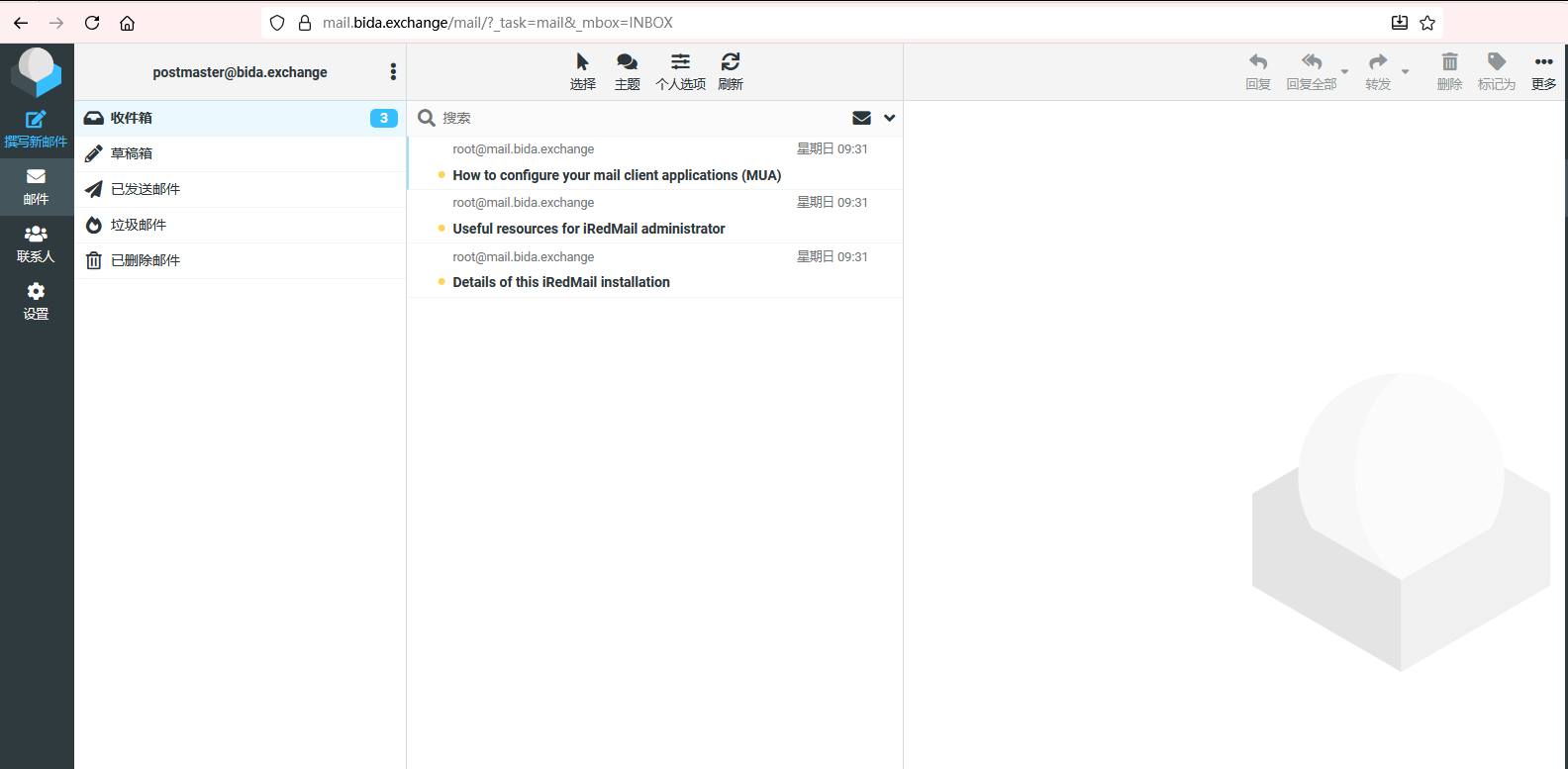
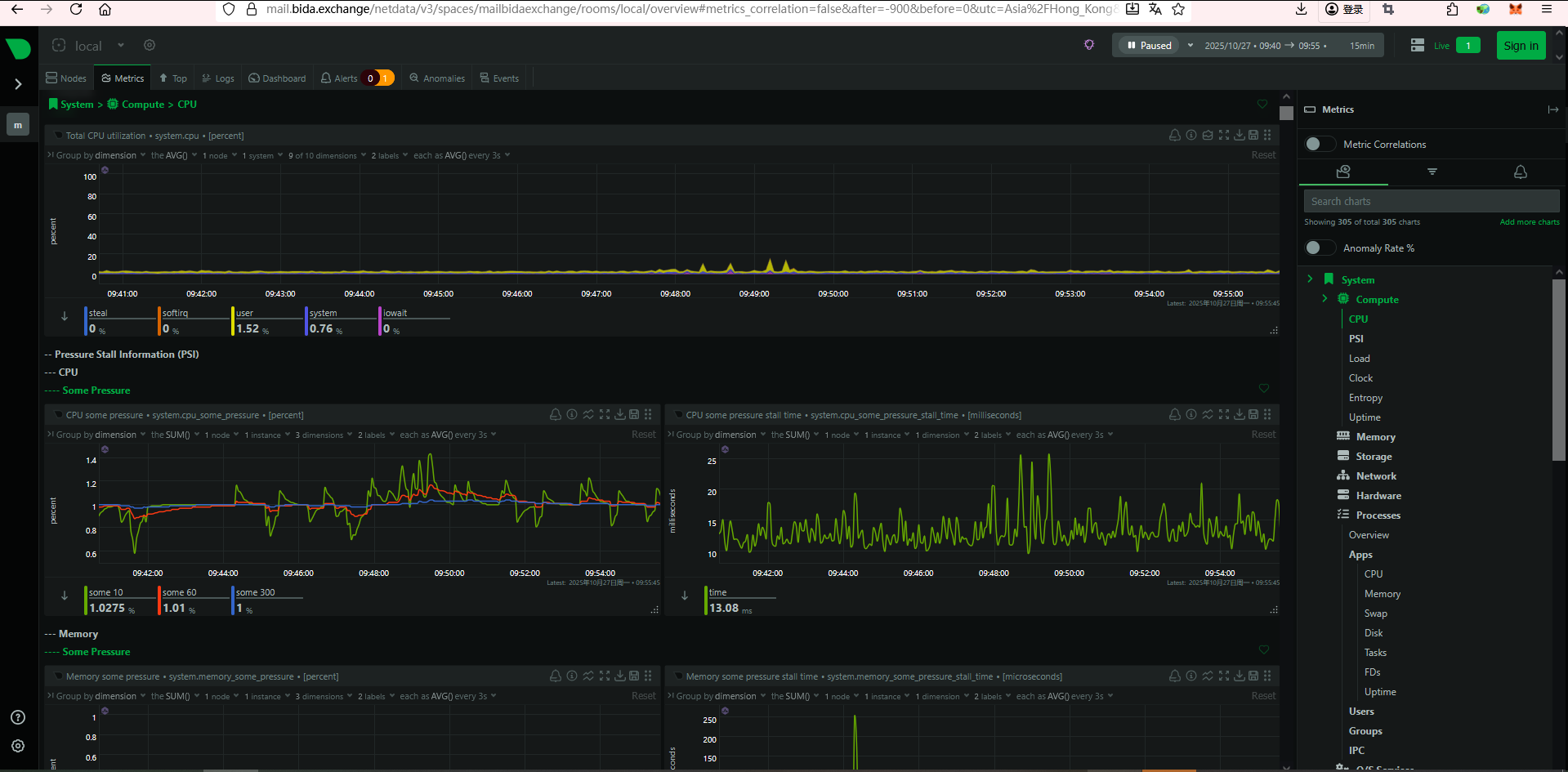
然后再浏览器重新打开 https://mail.bida.exchange/mail/ 就发现已经可以正常打开并登录了
登录
请登录后再发表评论。
评论列表:
目前还没有人发表评论